
Spec-Driven Development Tutorial using GitHub Spec Kit

Spec-Driven Development (SDD) is the idea of beginning every AI-assisted project with clearly defined requirements, not jumping right into code.
This companion piece takes that idea from theory to practice. Here, we’ll walk through the complete workflow, from the first line of a specification to long-term maintenance, using a real-world example.
If you want to see how to bring SDD to life and how tools like GitHub Spec Kit can help operationalize it, this guide will show you the way.
Before You Begin
Before diving into the step-by-step workflow, it’s worth pausing to see what makes Spec-Driven Development different from traditional agile or documentation-heavy approaches.
It isn’t about adding paperwork. It’s about creating clarity.
The goal is shared understanding, every contributor, human or AI, aligned around the same mental model.
The best specs are built together, with product, engineering, and QA shaping a single source of truth.
Once you start treating the spec as a living contract rather than a static document, the rest of the process naturally falls into place.
SDD Workflow Deepdive
Below is a practical, spec-first workflow using a trip-planner AI agent as the running example. We’ll reference GitHub-style spec tooling using GitHub’s Spec Kit to keep things concrete, but any well-structured markdown spec can work.
The same flow works with other tools or writing from scratch as long as you capture the same ingredients.

1) Specify
Goal: write a crisp product spec that states the problem, scope, users, success criteria, and constraints. Focus on what and why. Avoid implementation details here.
Trip-planner example (product spec highlights):
Problem: help travelers plan multi-city trips with realistic timing, budget guidance, and offline availability.
Users: casual travelers, travel bloggers, and small tour operators.
Key flows: create trips, add cities, auto-generate itinerary, adjust by preferences (pace, interests, budget), export to mobile.
Non-functional constraints: P95 itinerary generation under 4 seconds for 7-day trips. Store PII securely. Offline read mode on mobile.
Out of scope: airline booking, hotel payments.
Now run the /specify step to capture the above in a project-local spec that lives in version control so both humans and agents can reference it.
/specify Build a trip planner that generates day-by-day itineraries for multi-city travel.Include personas, key flows, success metrics, and constraints (perf, privacy, offline).It's a free to use platform.
Problem: help travelers plan multi-city trips with realistic timing, budget guidance, and offline availability.Users: casual travelers, travel bloggers, and small tour operators.Key flows: create trips, add cities, auto-generate itinerary, adjust by preferences (pace, interests, budget), export to mobile.Non-functional constraints: P95 itinerary generation under 4 seconds for 7-day trips. Store PII securely. Offline read mode on mobile.Out of scope: airline booking, hotel payments.
It will generate a markdown file with an initial specification based on your request. The more context and detail you provide, the stronger that first draft will be.
Keep in mind: this file isn’t a finished spec. It’s a starting point. It is usually easier to edit a draft than to write from a blank page.. You’ll need to review it carefully—read through, validate assumptions, adjust for your actual needs, and fill in any gaps.
The agent may flag certain sections with [NEEDS CLARIFICATION], which is a prompt for you to remove ambiguity or make key project decisions before moving forward.
Here’s an example excerpt from the generated spec document from the command above:
## Requirements *(mandatory)*
### Functional Requirements
- **FR-001**: System MUST generate day-by-day itineraries for multi-city trips up to [NEEDS CLARIFICATION: maximum trip length not specified - 30 days? 90 days?]
- **FR-002**: System MUST optimize travel routes between cities to minimize travel time and costs
- **FR-003**: Users MUST be able to input travel preferences including dates, cities, interests, and budget ranges
- **FR-004**: System MUST provide activity suggestions categorized by interests (art, food, culture, adventure, family-friendly, etc.)
- **FR-005**: System MUST calculate and display estimated costs for activities and transportation
Notice [NEEDS CLARIFICATION: maximum trip length not specified – 30 days? 90 days?]
Since we didn’t say anything about this, it’s asking us to adjust the specs and make it clear for the Agent and other people involved in this project.
2) Plan
Goal: translate the product spec into a technical plan. Choose stack, architecture, and integration boundaries. Call out risks.
Trip-planner example (technical plan highlights):
Architecture: API-first. Backend service + vector store for POI embeddings. Frontend web + mobile shell. (POI stands for “Point of Interest,” such as landmarks, attractions, or restaurants that the planner uses to build itineraries.)
AI: use a routing agent to choose POIs, a scheduler to pack days, a critic to check timing and transit.
Data: city catalogs, POI metadata, transit times.
Performance: target end-to-end plan in under 4 seconds at P95.
Security: redact PII in logs, encrypt at rest.
Risks: rate limits on external APIs, cost spikes from long prompts, cold starts.
With Spec Kit you can use /plan to record stack and architecture choices in the repo next to the spec so agents do not guess.
You don’t have to stick to any strict format when using this command. It accepts a freeform text prompt, so just describe your stack, tools, and architectural choices in your own words. Use commas, semicolons, or even line breaks if you like. The tool reads your input in context and turns it into a structured technical plan automatically.
That flexibility is by design. The idea is to capture what you mean, your technologies, roles, dependencies, not to force you into some rigid syntax.
If you prefer, you can also write your input as bullet points or separate lines. The result will be exactly the same.
/plan Stack: FastAPI + Postgres + Redis; Next.js front end; mobile via Expo. Agents: planner, scheduler, critic. Use OpenRouteService for travel times.
Once the spec looks solid and you run this command, the workflow shifts into more detailed implementation planning. At this stage, the spec doesn’t just describe what to build, it begins shaping how to build it, aligning development with the architecture and direction you’ve defined.
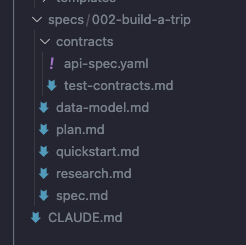
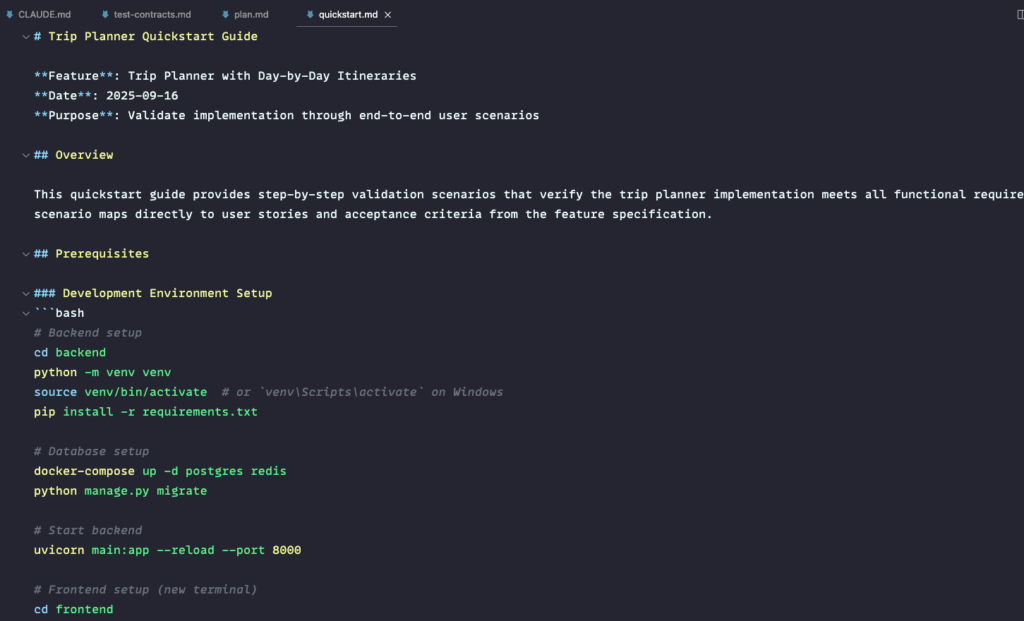
At this stage, the spec starts shaping implementation. The plan reduces ambiguity and accelerates reviews.. Remember that using these tools is just a helper for writing great specifications and feeding it to the agent. It’s always your responsibility to check and adjust anything in the generated specification.
3) Break into Tasks
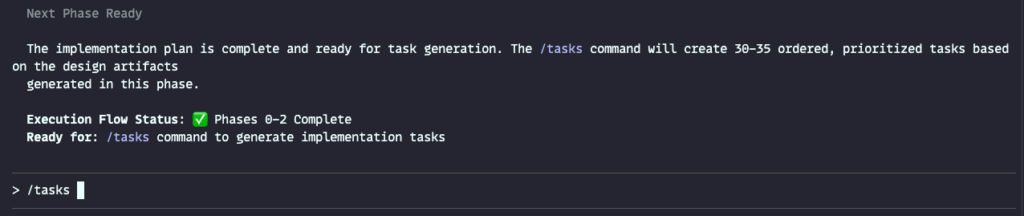
Goal: convert the plan into an ordered, testable task list with acceptance criteria. Include owner, dependencies, and links back to spec sections.
Trip-planner example (tasks):
API contract for itinerary generation, with request/response schemas.
Agent prompts and guardrails for planner, scheduler, critic.
Data loaders for POI metadata.
Caching and rate-limit handling.
Frontend flows: create trip, edit preferences, view itinerary, export.
Observability: timing spans, cost tracking, error taxonomies.
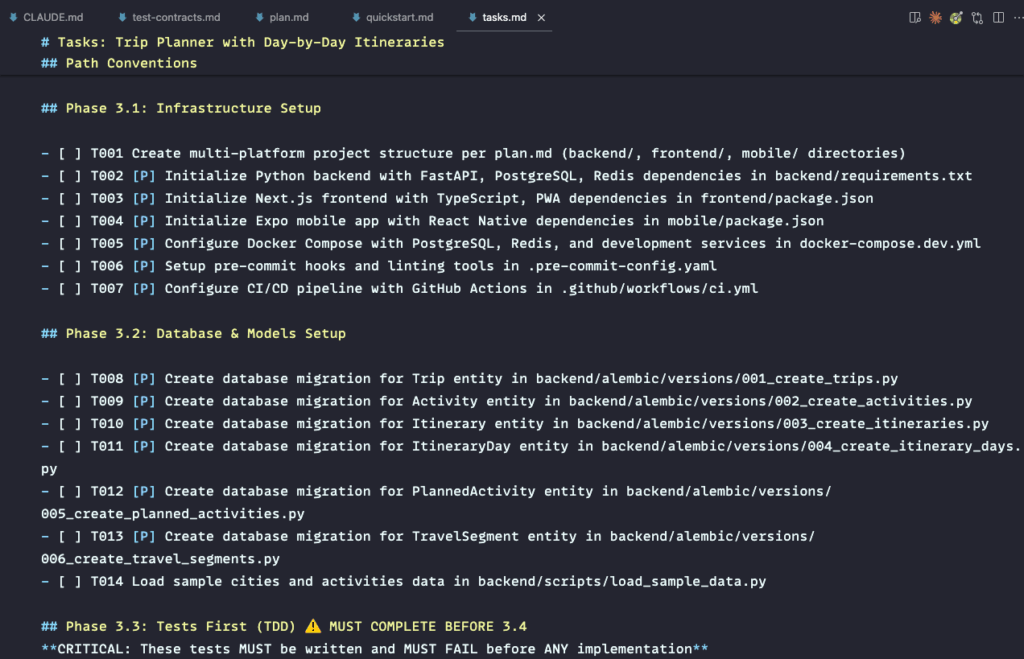
The list you see above is the kind of output you’ll get when you run the /tasks command in Spec Kit. Behind the scenes, the tool scans your SPEC.md and PLAN.md files, then builds a clear, connected backlog, complete with acceptance criteria, dependencies, and links back to the right sections of your spec.
Basically, you don’t have to handwrite every task yourself. Spec Kit drafts them automatically based on your project’s context. From there, you can review, tweak, and rearrange the list however you like before assigning owners or kicking off development.
So can just run /tasks to generate an actionable backlog that references the spec and the plan.
/tasks
4) Implement
Goal: execute tasks in small slices. Keep agents inside your constraints by pointing them back to SPEC.md and PLAN.md for every change.
Trip-planner example (one slice):
Implement POST /itinerary with schema validation and budget checks.
Add scheduler agent prompt that respects daily walking limits and opening hours.
Cache POI lookups and transit matrices.
Agents can work from the spec, the plan, and the task file, rather than ad-hoc prompts.
5) Tests
Goal: attach tests directly to requirements so you can trace “what was promised” to “what was delivered.”
Spec-Kit doesn’t include a separate /test command, testing is built into the workflow itself.
By default, it follows a test-driven development (TDD) structure: when you run /tasks, test-related items are automatically included and ordered before implementation tasks. This ensures that requirements are verified early and consistently.
If your project doesn’t follow TDD, you can explicitly state that in your specification to adjust task ordering.
Trip-planner example (tests):
Contract tests: request with 3 cities returns day-by-day plan with transit times and costs.
Property tests: no day exceeds 10 km walking; opening hours respected.
Performance checks: P95 latency under 4 seconds for a 7-day trip.
Security checks: PII never logged; redaction verified.
The spec and plan drive validations and checkpoints. Many teams pair this with contract-first samples or API specs that evolve alongside features.
6) Maintain
Goal: evolve safely as requirements change. Update the spec first, regenerate plan and tasks, and let agents refactor within those boundaries.
Trip-planner example (change request):
Add “family mode” that favors kid-friendly POIs and shorter walking segments.
Update spec.md constraints, re-run planning, regenerate affected tasks, adjust prompts, and extend tests for new rules.
Keep a changelog of spec revisions so future contributors see why trade-offs were made.
SDD treats the spec as a living artifact that feeds tasks, prompts, and validations. That makes mid-course corrections cheaper and more predictable.
Handling Partial Updates and Re-Planning
One common question is what happens when you tweak the spec and ask the planner to run again, after some of the code already exists. Because large language models don’t produce identical results every time, a re-plan can occasionally spill over and adjust parts of the project you didn’t mean to touch.
Teams usually rely on two practical workarounds to keep things under control:
1. Mark completed tasks as done
Spec-Kit keeps track of which tasks have been completed. When you flag something as “done” before re-planning, you’re effectively telling the system, and the AI agent behind it, hands off this section.
That said, the protection isn’t perfect. Users have noticed that a full re-plan can sometimes nudge or overwrite these “done” areas anyway. So it’s still smart to read through the new output before merging it back into the main branch.
2. Create a separate spec for new features
If you’re adding a big feature or experimenting with something fresh, it’s cleaner to spin up a new spec branch (for example, 001-feature-family-mode) instead of editing the main one. This approach follows Spec-Kit’s branch-based workflow and keeps your new code isolated, minimizing any knock-on effects elsewhere in the project.
Both methods are community-tested stopgaps until Spec-Kit offers true incremental-update support. They depend on the LLM respecting boundaries rather than enforcing them, which means a human review step isn’t optional, it’s essential before you accept any regenerated plans or tasks.
How AI Tools Fit Into the Process
Every phase of this workflow can be supported by different tools. Some teams keep it simple with markdown and GitHub. Others lean on AI-native platforms like Kiro or Claude Code.
What matters most is consistency. Once you decide where your spec lives, make sure every plan, task, and test points back to that same source of truth.
A disciplined setup beats a fancy tool every time.
Note on tooling
I’ve used GitHub’s Spec Kit here because it offers a ready path for spec → plan → tasks → implementation and ships repo-friendly templates. Any well-documented specification document can work, as long as you cover the main areas: goals, users, scope, constraints, architecture, data contracts, acceptance criteria, and tests. Use the tools that fit your environment; the principle remains the same.
So feel free to write your own specification document or use other templates. The most important thing here is to provide a concrete path for AI agents as a single source of truth. They won’t be assuming anything on the project, they just execute it according to what you’ve specified and then you can review the work.
The tool does not replace judgment. Teams still need to review, refine, and approve specs before coding begins.
Common Pitfalls When Applying Spec-Driven Development
Even teams that adopt the right workflow can stumble if they treat specs as one-time tasks instead of living assets.
Over-specifying too early
You don’t need to capture every pixel or parameter before building. Specs should evolve with insight. Contract-first research on APIs shows that an early, lean contract accelerates feedback; you can refine details once real data surfaces. Aim for just-enough structure to support test automation and AI generation, then iterate as you validate assumptions.
Letting specs drift
When changes sneak into production without a corresponding spec update, reviewers lose confidence in both sources. Treat the document as the change-log’s front line: update the spec first, then merge the code. This discipline preserves traceability for later audits and enables AI agents to generate accurate tests or documentation against the newest contract.
No clear ownership
Someone must be accountable for the health of the spec. Appoint a “spec steward”, a role that rotates but always exists. The steward ensures merge requests include spec updates, flags inconsistencies early, and champions living documentation at retrospectives. Without that curator, specs quickly fall prey to “someone else will fix it later” syndrome.
Focusing on the what instead of the why
A great spec captures rationale as well as requirements. Future teammates—human or AI—need context to make confident changes. Including the business driver (“reduce checkout time to under two seconds”) or the risk mitigated (“meet SOC 2 audit log mandates”) helps newcomers reason about trade-offs instead of repeating past debates.
Scaling Spec-Driven Workflows Across Teams
When more developers, or AI agents, join a project, the benefits of Spec-Driven Development multiply.
A Shared vocabulary across squads
When multiple feature crews reference the same glossary of user flows, metrics, and error states, conversations stay crisp. Specs eliminate dueling definitions of “session,” “tenant,” or “SLA,” lowering the friction that often plagues cross-functional work.
Accelerated onboarding
Instead of wading through endless chat threads, new hires skim change-tracked specs to see how requirements evolved. A well-curated history section reads like an executive summary of design debates, letting engineers reach productive coding in days rather than weeks.
Safe Parallel development
Teams can code separate modules at the same time when interfaces are frozen in a contract. Mock servers and test harnesses generated from that specification surface integration issues early, long before staging, cutting costly rework.
Auditability for regulated domains
Financial-services or medical-device teams often need a provable chain from requirement to implementation. A spec commit linked to every release provides that chain and satisfies auditors who demand evidence of due diligence. Siemens Polarion research shows that failing to maintain requirement-to-code traceability is now a top cause of non-compliance penalties.
When to Introduce This Workflow
Not every project needs this level of structure. A full spec-first approach delivers the biggest return when you’re working on:
Complex systems with many contributors
Microservice architectures, multi-repo front-ends, and AI-powered back-ends thrive when every boundary is explicit. The spec shields each team from internal churn and enables contract testing to catch interface regressions automatically.
High-stakes features
Payment flows, healthcare diagnostics, or safety-critical automation cannot rely on implicit tribal knowledge. Formal specs encode performance, security, and reliability thresholds so CI tooling can block a release that drifts below the bar.
Long-term projects that will outlive the founding team
Turnover is inevitable. A living specification serves as institutional memory, preserving design intent for future maintainers who would otherwise reverse-engineer decisions from commit history.
For quick prototypes or design experiments, you can lighten the process: a short spec, a simple plan, and a few manual notes are often enough to preserve intent without slowing momentum.
Final Thoughts
Spec-Driven Development doesn’t replace creativity, it gives it form. By anchoring AI-driven work in clear intent and traceable artifacts, you build systems that ship faster and evolve more safely.
Whether you’re using GitHub Spec Kit, Claude Code, or a custom markdown setup, the rhythm stays the same:
specify clearly, plan with intent, test without compromise, and evolve with purpose.
That’s how teams move from vibe-coding to real engineering discipline.
About the author
AI Engineer
Comments
Join the discussionNo comments yet. Be the first to comment.


